Atlanyas guide
A private place for shadow-work writing
Updated 5 October 2026 · AgemoWare LLC
Atlanyas pairs prompts with a journal so you can notice patterns in your own words. Choose a question that feels relevant, write only what you want to record, and return when it is useful.
Choose a theme or prompt
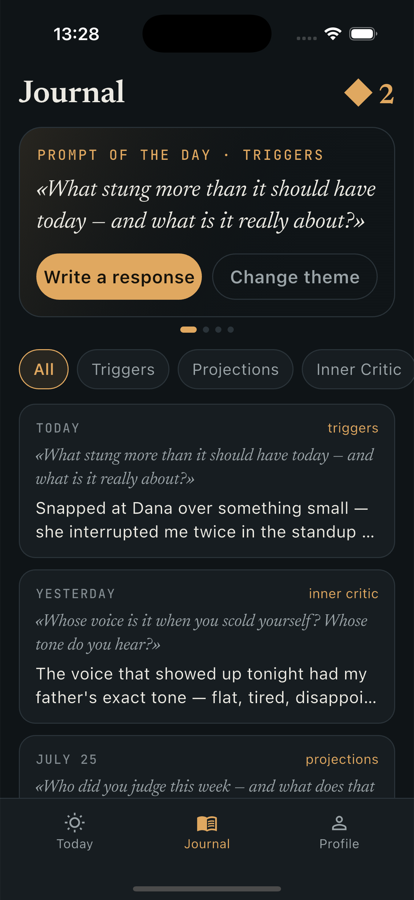
Open Journal or the Shadow Work area and choose a theme. The available themes include topics such as triggers, projections, the inner critic, boundaries, shame, anger, envy, control, worth, and masks. Read the prompt and decide whether it fits what you want to reflect on today. You can move to a different theme if it does not.
A prompt is a starting point, not an assignment. You do not need to finish every theme, disclose more than you want, or arrive at a single conclusion. Atlanyas includes three free journal themes; Atlanyas+ unlocks the full set and export. The app may offer a daily reminder, which you can manage in Settings.
Write a specific observation
Tap the writing action to open the writing surface. You might describe what happened, what you noticed in your reaction, or what question remains. A few concrete sentences can be easier to revisit than a broad judgment about yourself. Use the entry counter as a guide to text length if helpful; it is not a quality score.
Save the entry when you are ready. The journal timeline lets you return to previous writing. Your entries and private notes are stored on the device, and journal text is not uploaded to Atlanyas servers. This is separate from optional account backup for the birth profile and from account-based People connections. Device-level cloud backups are governed by your Apple or Google settings.
Keep privacy and wellbeing in view
If you share a device, use its screen lock and consider who can access the device backup. Deleting app data removes local content but does not control copies made by the device's operating-system backup. If you export an entry, the exported file is outside the app's private storage and follows the destination app's sharing and retention behavior.
Reflection can bring up difficult feelings. Pause or choose another prompt when you need to. Atlanyas is not therapy and the journal does not provide clinical care. Seek qualified support for mental-health concerns or urgent needs.
Keep in mind
The journal is a reflection tool, not mental-health treatment or professional advice. Entries stay on the device within Atlanyas, but device backups and exported files are governed by other services.
Common questions
Are journal entries uploaded to Atlanyas?
No. Entries and private notes are stored on your device. Operating-system backups and files you export follow the settings and services you choose.
Do I need to write every day?
No. Use a prompt or reminder when it suits you; the journal can be used at your own pace.
What does Atlanyas+ add to the journal?
Atlanyas+ unlocks all journal themes and entry export. Three themes are available without a subscription.
Learn more in the common questions, or contact support.