Atlanyas guide
How to start reading your Human Design bodygraph
Updated 5 October 2026 · AgemoWare LLC
A bodygraph can feel dense on first view. Begin with the chart summary, then open individual elements to see how Atlanyas explains the calculated result attached to your birth details.
Check the birth information first
Atlanyas uses the shared birth profile, so there is no separate Human Design birth form. Open Human Design from Home after entering your date, exact time, and birthplace in the birth flow. Confirm the place and clock time carefully; local time-zone rules affect the instant used for the calculation. Chart mathematics runs on your device using an ephemeris.
If the time is unknown or was not resolved to a single instant, the app needs you to update the profile before it can show a personal bodygraph. Do not use noon or midnight as a stand-in. If no usable profile exists, the Human Design screen provides an action to add birth details rather than displaying an example chart as your own.
Start with the summary
Read the type, strategy, authority, and profile shown for your chart as a starting set of terms. Tap a label to open its explanation in Atlanyas. The app's descriptions are tied to the calculated chart; they are not a substitute for checking whether an interpretation feels useful in your own life.
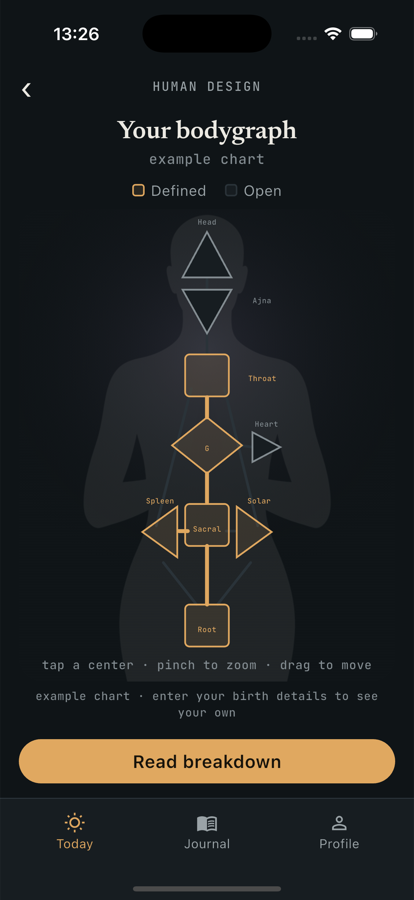
Next, look at the bodygraph diagram. It shows centers and the connections between them, with chart-specific gates and channels represented in the drawing. The diagram is a map of the system's categories, not a medical scan or a measurement of a person's ability. When a term is unfamiliar, open its detail screen rather than trying to infer a full meaning from color or shape alone.
Explore details in small steps
Choose one center or channel at a time. The center screens describe defined and open centers for the chart; the channel and gate screens add more specific readings. Some deeper readings require Atlanyas+. You can still use the included chart and core readings without purchasing a plan; locked depth content is clearly part of the premium offering.
If you are comparing charts with another person, use the People features only with someone you trust. Connections involve sharing derived chart results, and full-chart access can involve birth details being retrieved on the other person's device. The visibility control changes what appears in the interface; it does not prevent an authorized connected device from receiving the inputs needed to calculate a chart. Review the privacy policy before connecting.
Keep in mind
Human Design is offered as a framework for reflection. Its categories are not scientific diagnoses, predictions, or professional advice; chart details depend on accurate birth inputs.
Common questions
What information does the bodygraph need?
It needs a birth date, an exact resolved birth time, and birthplace information from the shared profile.
Why can't I see a bodygraph with an unknown time?
The calculation depends on an exact instant. Atlanyas leaves it unavailable rather than substituting a guessed time or presenting a sample chart as yours.
Are all readings included for free?
The full chart and core readings are available free. Deeper readings for centers, gates, and channels are part of Atlanyas+.
Learn more in the common questions, or contact support.